import { Image } from “astro:assets”; import myPhoto from ”./images/my-photo.png”;
IP Routing and Routing Protocols
Definition
IP Routing is the process of forwarding IP packets from one network to another using routers. Routers determine the best path to the destination network by consulting their routing tables.
Key Points
What is IP Routing?
- IP routing allows communication between different networks.
- Routers examine the destination IP address of each packet.
- Routers determine the best next-hop using the routing table.
- The packet is then forwarded toward its destination.
Example
PC A
192.168.1.10
     │
     │
Router R1
     │
     │
Router R2
     │
PC B
10.1.1.20
The routers forward the packet until it reaches the destination network.
Routing Table
Definition
A Routing Table is a database maintained by a router that contains information about reachable networks and the paths used to reach them.
Characteristics
- Stored in RAM.
- Used to determine the next hop.
- Updated manually (static routing) or automatically (dynamic routing).
Information Stored in a Routing Table
Typical entries include:
- Destination network
- Subnet mask (prefix)
- Next-hop IP address
- Exit interface
- Routing protocol
- Administrative Distance (AD)
- Metric
Types of Routing
There are three common types of routing:
- Static Routing
- Default Routing
- Dynamic Routing
Static Routing
Definition
Static Routing is a routing method where the network administrator manually configures routes on every router.
The router does not learn routes automatically.
Advantages
- Low CPU usage
- No routing protocol traffic (no bandwidth overhead)
- Better security
- Simple for very small networks
- Predictable routing behavior
Disadvantages
- Manual configuration required
- Difficult to maintain
- Poor scalability
- Every topology change requires manual updates
- Not suitable for large networks
Static Route Configuration
Using Next-Hop IP
Router(config)# ip route <destination-network> <subnet-mask> <next-hop-IP>Example
R1(config)# ip route 192.168.10.0 255.255.255.0 192.168.20.1Explanation
ip route→ Creates a static route.192.168.10.0→ Destination network.255.255.255.0→ Subnet mask.192.168.20.1→ Next-hop router.
Using Exit Interface
Router(config)# ip route <destination-network> <subnet-mask> <exit-interface>Example
R1(config)# ip route 192.168.10.0 255.255.255.0 Serial2/0The router forwards packets through the specified interface.
Verify Static Routes
show ip interface briefDisplays interface status.
show ip routeDisplays the routing table.
show ip route staticDisplays only static routes.
show running-config | include ip routeShows configured static routes.
show ip protocolsDisplays routing protocol information.
show ip route <network> <mask>Displays a specific route.
Note: In networking, a Network ID (NID) is often referred to as a prefix.
Default Routing
Definition
A Default Route is used when the router does not know a specific route to the destination network.
It is commonly configured on stub routers.
Stub Router
A Stub Router has only one path leading out of the local network.
Default Route Configuration
Router(config)# ip route 0.0.0.0 0.0.0.0 <next-hop-IP | exit-interface>Example
R1(config)# ip route 0.0.0.0 0.0.0.0 192.168.1.1This route matches any unknown destination.
Verify Default Routing
debug ip packetsDisplays packet forwarding information.
debug ip routingDisplays routing updates and routing decisions.
Dynamic Routing
Definition
Dynamic Routing uses routing protocols to automatically discover networks and exchange routing information between routers.
Routers update their routing tables whenever the network topology changes.
Functions of Dynamic Routing Protocols
- Discover neighboring routers
- Exchange routing information
- Build routing tables
- Update routes automatically
- Determine the best path
Advantages
- Automatic updates
- Suitable for large networks
- Easier administration
- Supports redundant paths
- Automatically adapts to failures
Disadvantages
- Uses CPU resources
- Consumes network bandwidth
- More complex than static routing
Routed Protocol vs Routing Protocol
Routed Protocol
Definition
A Routed Protocol carries user data across networks.
Examples:
- IPv4
- IPv6
- IPX
- AppleTalk
Routing Protocol
Definition
A Routing Protocol allows routers to exchange routing information and determine the best paths.
Examples:
- RIP
- OSPF
- EIGRP
- IS-IS
- BGP
Comparison
| Routed Protocol | Routing Protocol |
|---|---|
| Carries user data | Exchanges routing information |
| Used by hosts and routers | Used only by routers |
| Example: IPv4 | Example: OSPF |
Components of a Routing Protocol
1. Algorithm
Determines the best route to a destination.
Examples:
- Hop Count
- Cost
- Bandwidth
- Delay
2. Routing Messages
Used to:
- Discover neighbors
- Exchange routing information
- Update routing tables
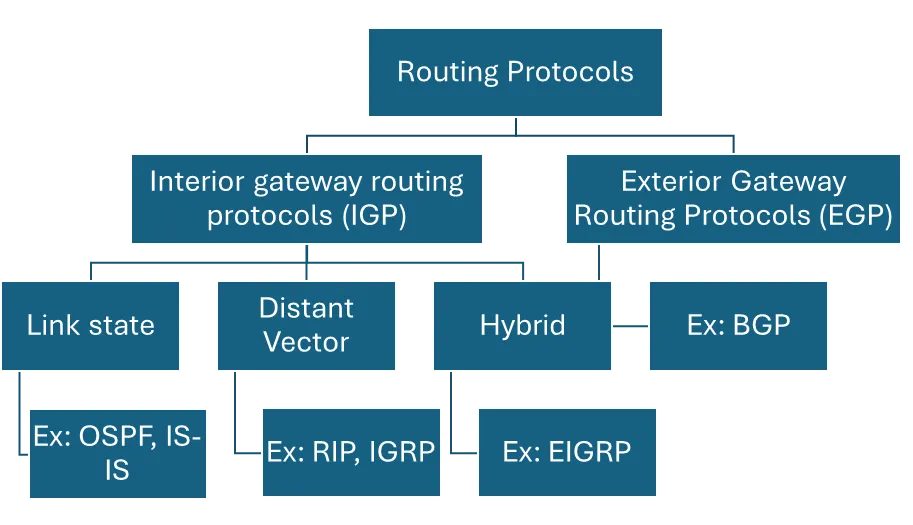
Classification of Routing Protocols
Routing protocols are divided into:
Routing Protocols
│
├── Interior Gateway Protocols (IGP)
│     ├── Distance Vector
│     ├── Link State
│     └── Hybrid
│
└── Exterior Gateway Protocols (EGP)
      └── BGP
Interior Gateway Protocol (IGP)
Definition
IGP protocols operate within a single organization or autonomous system (AS).
Examples:
- RIP
- OSPF
- EIGRP
- IS-IS
Exterior Gateway Protocol (EGP)
Definition
EGP protocols exchange routing information between different autonomous systems, such as between Internet Service Providers (ISPs).
Example:
- BGP (Border Gateway Protocol)
Distance Vector Routing Protocols
Definition
Distance Vector protocols determine the best path primarily based on distance, commonly measured by hop count.
Examples:
- RIP
- IGRP (Cisco proprietary; obsolete)
Characteristics
- Uses Hop Count
- Periodically sends the entire routing table
- Sometimes called “Routing by Rumor”
- Simple but slower to converge
Hop Count
Every time a packet passes through a router, it counts as one hop.
Example:
PC
 │
R1
 │
R2
 │
R3
 │
Server
Hop Count = 3
Link-State Routing Protocols
Definition
Link-State protocols maintain a complete view of the network topology and calculate the shortest path using the Shortest Path First (SPF) algorithm.
Examples:
- OSPF
- IS-IS
Router Databases
A Link-State router maintains:
- Neighbor Table
- Link-State Database (network topology)
- Routing Table
Characteristics
- Sends updates only when changes occur.
- Builds a complete network map.
- Uses Cost as its metric (OSPF).
- Fast convergence.
Hybrid Routing Protocols
Definition
Hybrid protocols combine features of both Distance Vector and Link-State routing.
Example:
- EIGRP (Enhanced Interior Gateway Routing Protocol)
Characteristics
- Fast convergence
- Efficient updates
- Supports multiple metrics
- Cisco proprietary in its original implementation
Distance Vector vs Link-State
| Feature | Distance Vector | Link-State |
|---|---|---|
| Network View | Partial | Complete |
| Updates | Periodic full-table updates | Triggered updates after changes |
| Convergence | Slower | Faster |
| Resource Usage | Lower | Higher |
| Examples | RIP, IGRP | OSPF, IS-IS |
Classful Routing Protocols
Definition
Classful routing protocols do not include subnet mask information in routing updates.
Requirements:
- All subnets must use the same subnet mask.
Examples:
- RIPv1
- IGRP
Classless Routing Protocols
Definition
Classless routing protocols include subnet mask information in routing updates.
Advantages:
- Support Variable Length Subnet Masks (VLSM)
- Support CIDR (Classless Inter-Domain Routing)
Examples:
- RIPv2
- OSPF
- EIGRP
- IS-IS
Classful vs Classless
| Classful | Classless |
|---|---|
| No subnet mask in updates | Includes subnet mask |
| No VLSM support | Supports VLSM |
| Less flexible | More flexible |
| RIPv1, IGRP | RIPv2, OSPF, EIGRP, IS-IS |
Metric
Definition
A Metric is a value used by a routing protocol to determine the best path to a destination.
The route with the lowest metric is generally preferred.
Metrics Used by Routing Protocols
| Routing Protocol | Metric |
|---|---|
| RIP | Hop Count |
| OSPF | Cost (based primarily on bandwidth in Cisco implementations) |
| IGRP | Bandwidth, Delay, Reliability, Load |
| EIGRP | Bandwidth and Delay (by default); can also consider Reliability and Load |
Administrative Distance (AD)
Definition
Administrative Distance (AD) measures the trustworthiness of the source of routing information.
- Range: 0–255
- Lower AD = More trusted
- AD 255 = Route is never used
Default Administrative Distance Values
| Route Source | Default AD |
|---|---|
| Connected Interface | 0 |
| Static Route | 1 |
| EIGRP (Internal) | 90 |
| IGRP | 100 |
| OSPF | 110 |
| RIP | 120 |
| EIGRP (External) | 170 |
| Unknown | 255 |
Example
If a router learns the same route through both OSPF and RIP:
| Protocol | AD |
|---|---|
| OSPF | 110 |
| RIP | 120 |
The router selects the OSPF route because it has the lower Administrative Distance.
Gateway of Last Resort
Definition
The Gateway of Last Resort is another name for the default route.
When no matching route exists in the routing table, packets are forwarded to the default gateway.
Example:
Known Route?
     │
 ┌───┴────┐
 │        │
Yes      No
 │        │
Forward   Use Default Route
Example / Code
Configure a Static Route
R1(config)# ip route 10.10.10.0 255.255.255.0 192.168.1.2Explanation
- Creates a route to the
10.10.10.0/24network. - Packets are forwarded to the next-hop router at
192.168.1.2.
Configure a Default Route
R1(config)# ip route 0.0.0.0 0.0.0.0 192.168.1.1Explanation
- Creates a Gateway of Last Resort.
- Used whenever no specific route matches the destination.
Display the Routing Table
R1# show ip routeExplanation
Displays:
- Connected routes
- Static routes
- Dynamic routes
- Default route
- Route metrics and administrative distances
Common Mistakes
-
Confusing routed protocols (e.g., IPv4) with routing protocols (e.g., OSPF).
-
Assuming static routes update automatically.
-
Forgetting to update static routes after topology changes.
-
Confusing Metric with Administrative Distance:
- Metric selects the best path within the same routing protocol.
- Administrative Distance selects the most trusted route between different routing sources.
-
Believing default routes replace all routing entries; they are only used when no more specific route exists.
-
Assuming all routing protocols support VLSM; classful protocols do not.
Short Exam Notes
- IP Routing: Forwarding packets between different networks.
- Routing Table: Database of reachable networks stored in RAM.
- Static Routing: Manual configuration; suitable for small networks.
- Default Routing: Uses
0.0.0.0/0; ideal for stub routers. - Dynamic Routing: Automatically exchanges routing information.
- Routed Protocols: IPv4, IPv6, IPX, AppleTalk.
- Routing Protocols: RIP, OSPF, EIGRP, IS-IS, BGP.
- IGP: Used within one organization.
- EGP: Used between autonomous systems (BGP).
- Distance Vector: Uses hop count; periodic updates; examples: RIP, IGRP.
- Link-State: Uses SPF and cost; examples: OSPF, IS-IS.
- Hybrid: Combines DV and LS features; example: EIGRP.
- Classful: No subnet mask in updates (RIPv1, IGRP).
- Classless: Includes subnet mask; supports VLSM (RIPv2, OSPF, EIGRP, IS-IS).
- Administrative Distance: Lower value = more trusted.
- Default AD Values: Connected = 0, Static = 1, EIGRP = 90, OSPF = 110, RIP = 120, Unknown = 255.