Operating System Types and Structures / Architectures
Definition
An Operating System (OS) is system software that provides an interface between user application programs and computer hardware. Because an operating system is complex, its architecture defines how its components are organized and how they communicate with each other.
Key Points
1. Batch Processing Systems
- Popular during the 1940s–1950s.
- Users did not interact directly with the computer.
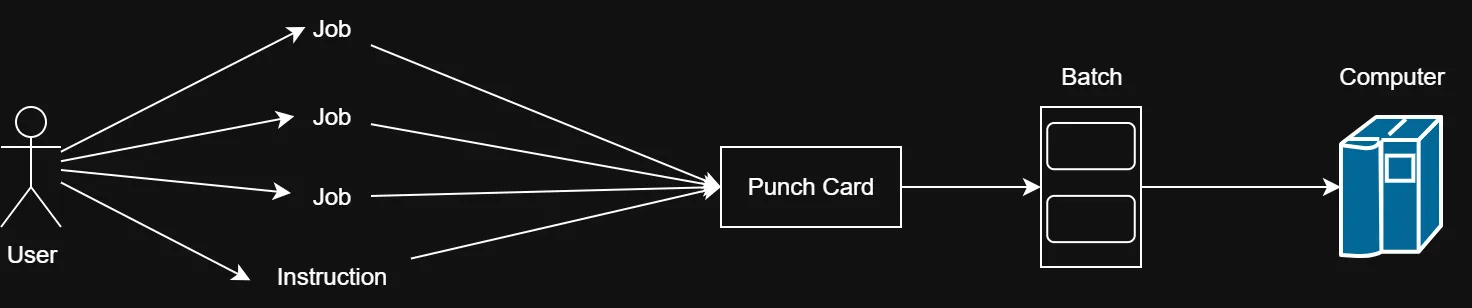
- Users prepared jobs using offline devices such as punch cards.
- Jobs were submitted to a computer operator.
- The operator grouped similar jobs into batches and submitted them for processing.
- CPU utilization was generally low.
- It was difficult to prioritize one job over another.
Basic Flow
User → Computer Operator → Batch of Jobs → Computer → Processing
Batch means a group of jobs collected together for processing.
2. Multiprogramming Systems
-
Emerged during the 1950s–1960s.
-
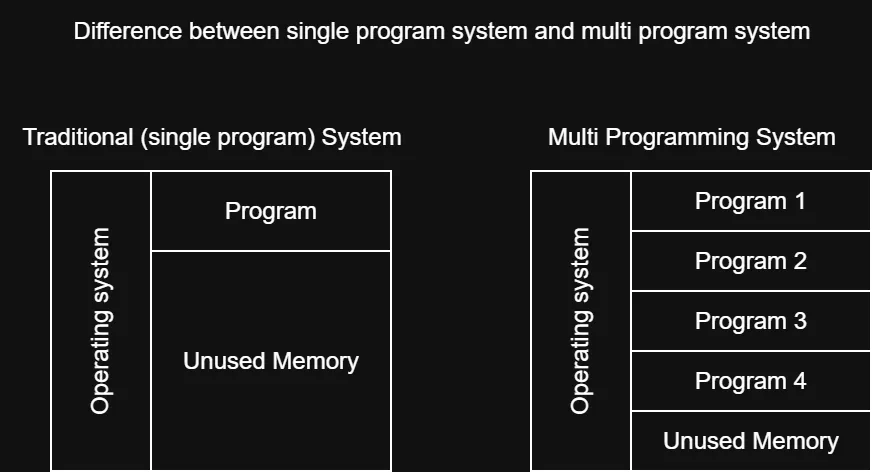
Multiple programs could be loaded into main memory (RAM) simultaneously.
-
Each program was given its own memory space.
-
If one program was waiting for an I/O operation, the CPU could work on another program.
-
This reduced CPU idle time.
-
Improved:
- CPU utilization
- System efficiency
- Throughput
-
Multiprogramming became a foundation for modern multitasking operating systems.
Important Term: Throughput
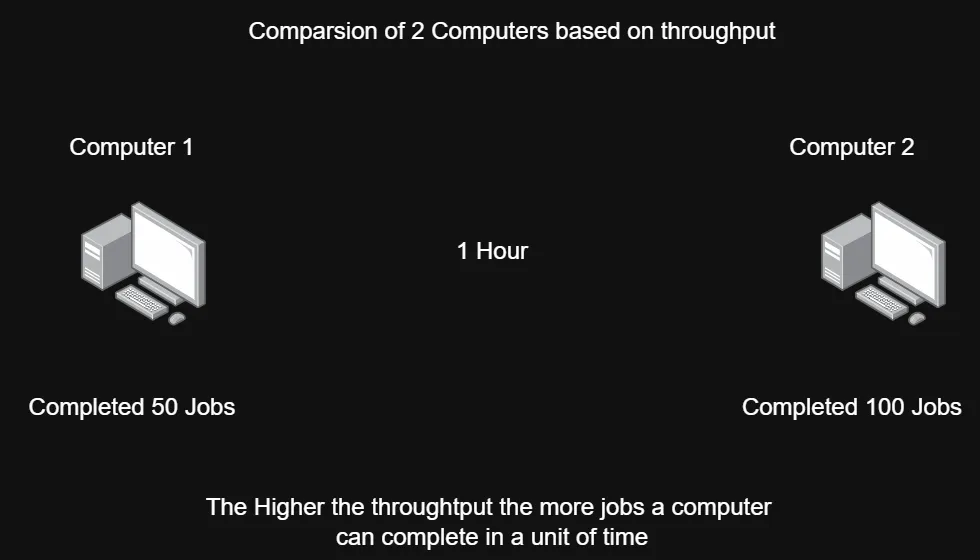
Throughput = the number of jobs completed per unit of time.
Example:
If a system completes 50 jobs in 1 hour:
Important Correction: Context Switch
A context switch is not a device that moves programs between RAM and CPU.
It is the process of saving the state of one running process and loading the saved state of another process, allowing the CPU to switch between processes.
3. Time-Sharing Systems
-
Developed and widely used during the 1960s–1970s.
-
Time-sharing is a logical extension of multiprogramming.
-
Multiple users/processes can interact with the computer.
-
CPU time is divided into small units called:
- Time slice
- Time quantum
-
The OS rapidly switches the CPU between processes/users.
-
Provides an interactive computing environment.
-
Gives users the impression that they have their own dedicated computer.
-
Improves CPU utilization and provides quick response times.
-
Examples mentioned in the slides:
- UNIX
- Linux
Round Robin
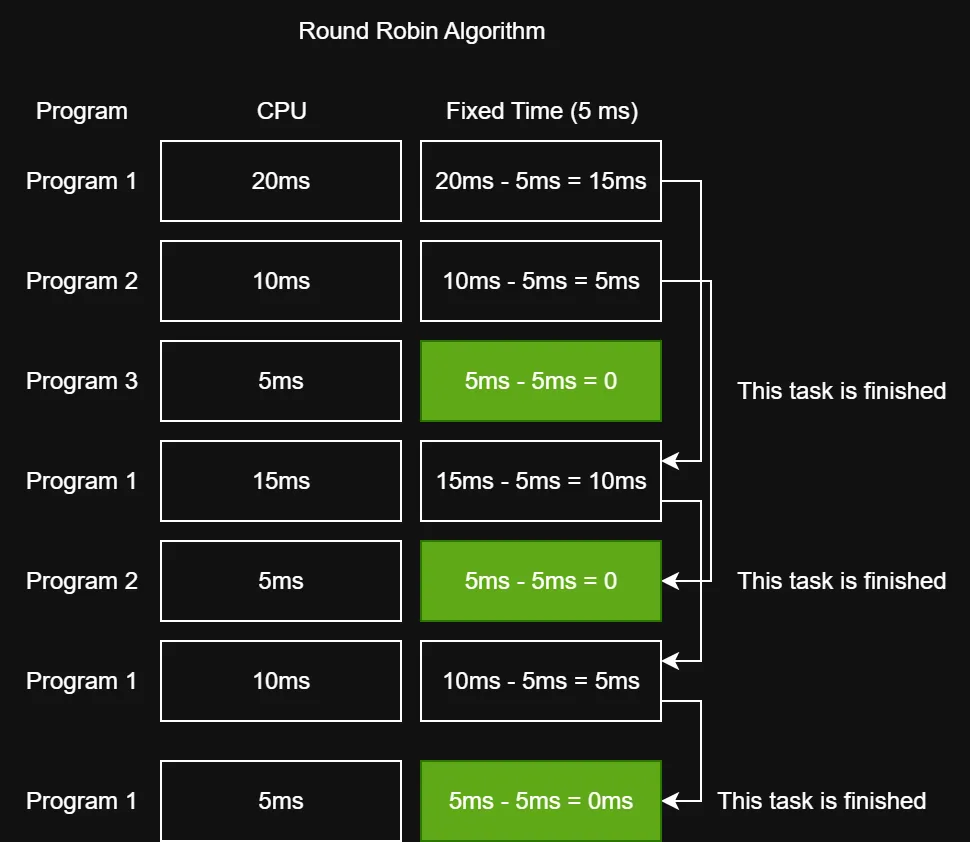
A common scheduling approach associated with time-sharing is Round Robin.
Each process receives a fixed amount of CPU time.
Example:
Process A → 100 ms
Process B → 100 ms
Process C → 100 ms
Process A → 100 ms
Process B → 100 ms
...
If a process does not finish during its time slice, it waits for another turn.
Important: Round Robin is a CPU scheduling algorithm, while time-sharing is an operating-system approach/concept.
4. GUI-Based Systems
-
Became popular during the 1970s–1980s.
-
Provide a Graphical User Interface (GUI).
-
Users interact through:
- Windows
- Icons
- Menus
- Buttons
-
Reduce the need to memorize complex commands.
-
Make computers easier for beginners to use.
-
Commonly use pointing devices such as a mouse or touchpad.
-
Support multitasking through multiple windows and applications.
-
Microsoft Windows is a major example.
5. Networked Systems
-
Became widely popular during the 1980s–1990s.
-
A Network Operating System (NOS) can run on a server and manage network resources.
-
Supports management of:
- Users
- Groups
- Files
- Applications
- Security
-
Allows multiple computers to share resources.
-
Can provide:
- Shared file access
- Shared printers
- Communication between computers
-
Supports networks such as LAN and other network environments.
-
Provides centralized administration and network management.
6. Mobile Operating Systems
-
Earlier mobile systems included Symbian OS and Java ME.
-
They primarily supported basic functions such as calling, messaging, and simple applications.
-
The development of smartphones created demand for more advanced operating systems.
-
Modern mobile operating systems support:
- Multitasking
- Internet access
- Multimedia
- Touchscreens
- Mobile applications
-
Major modern examples include:
- Android
- iOS
7. AI-Powered Operating Systems
Since the 2010s, AI technologies have increasingly been integrated into modern operating systems.
AI can help systems:
- Understand user commands.
- Recognize speech.
- Process natural-language commands.
- Automate tasks.
- Analyze user preferences.
- Provide personalized recommendations.
- Improve productivity and accessibility.
Examples mentioned in the slides include:
- Siri
- Google Assistant
- Amazon Alexa
Operating System Structures / Architectures
Definition
OS architecture describes how the components of an operating system are organized and how they communicate with applications and hardware.
The slides identify five popular architectures:
- Simple Architecture
- Monolithic Architecture
- Microkernel Architecture
- Layered Architecture
- Modular Architecture
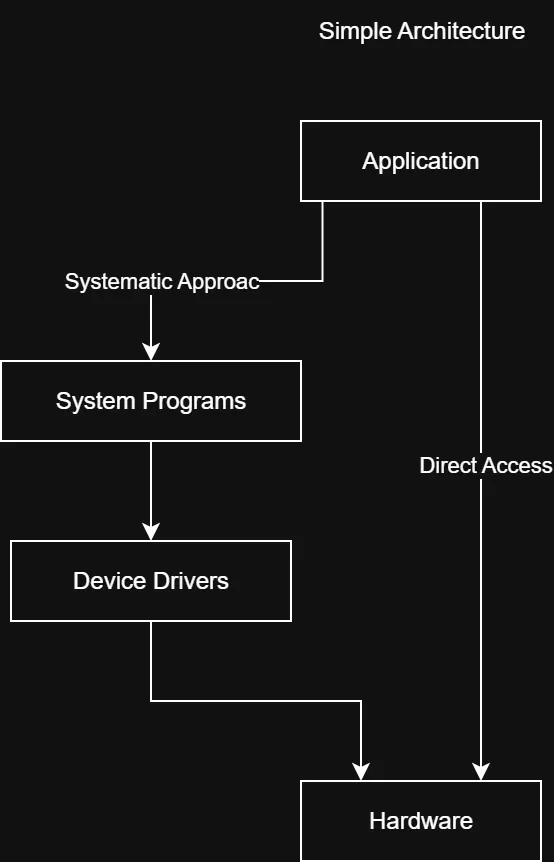
1. Simple Architecture
Key Points
- Simple operating systems have a relatively uncomplicated structure.
- They often started as small systems and later expanded beyond their original design.
- MS-DOS is the example given in the slides.
- The architecture has relatively few interfaces and layers.
- Components can be closely connected.
Advantages
- Easy development
- Good performance
Because there are fewer layers and less overhead, interaction with hardware can be relatively direct.
Disadvantages
- Frequent system failures
- Poor maintainability
Because components are tightly coupled, a failure or modification in one part can affect other parts.
Example
Application
     ↓
System Programs
     ↓
Hardware
The exact internal structure of MS-DOS is more complicated than this simplified representation, so this diagram should be understood as a basic conceptual model, not an exact architecture diagram.
2. Monolithic Architecture
Definition
In a monolithic architecture, a central kernel is responsible for most major operating-system operations.
These can include:
- File management
- Memory management
- Device management
- Other OS services
The kernel has access to system resources and acts as an interface between applications/system programs and hardware.
Advantages
- Relatively straightforward design because major functionality is concentrated in the kernel.
- Good performance because OS services can communicate efficiently within the kernel.
Disadvantages
- A serious kernel failure can affect the entire operating system.
- Adding or changing services can be difficult because components are closely connected.
Basic Structure
Applications
     ↓
   Kernel
     ↓
  Hardware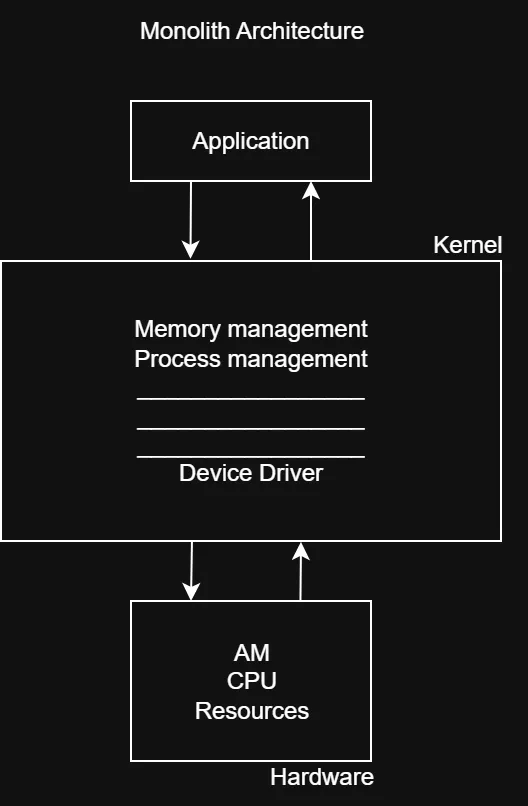
3. Microkernel Architecture
Definition
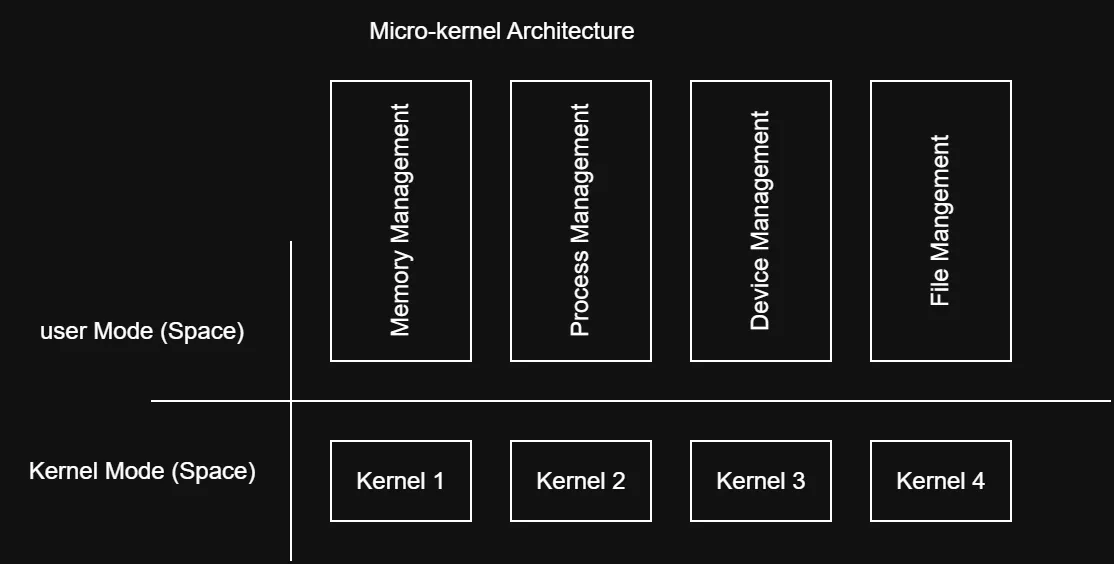
A microkernel architecture keeps the kernel as small as possible and moves many operating-system services outside the kernel.
The slide describes the approach as dividing functionality into separate components/services, with the goal of improving stability and maintainability.
Important Correction to Your Notes
Your note says:
“In micro-kernel, we have multiple kernels.”
This is not technically correct.
A microkernel system does not normally mean that there are multiple kernels.
Instead:
- There is one small microkernel.
- Many OS services can run separately, often as user-space processes/servers.
- These services communicate with each other and with the microkernel.
A simplified model is:
Applications
     ↓
OS Services
(File, Network, Drivers, etc.)
     ↓
Microkernel
     ↓
Hardware
IPC
IPC = Inter-Process Communication
IPC allows separate processes to communicate and exchange information.
In microkernel systems, IPC is particularly important because many services are separated into different processes. Communication between these components can involve message passing.
Advantages
- Reliability and stability
- Maintainability
- Smaller components are easier to manage independently.
Disadvantages
- More complex to design
- Communication between separate components can introduce additional overhead and potentially reduce performance compared with some monolithic designs.
Common Mistakes
-
Multiprogramming ≠ multitasking
- Multiprogramming keeps multiple programs in memory and switches when one waits.
- Modern multitasking builds on these ideas and emphasizes responsive execution.
-
Context switch ≠ moving a program from RAM to CPU
- A context switch saves one process’s CPU state and restores another’s state.
-
Throughput ≠ execution time
- Throughput measures how many jobs are completed per unit of time.
-
Time-sharing ≠ Round Robin
- Time-sharing is the overall concept.
- Round Robin is a scheduling algorithm commonly used to implement time-sharing.
-
Microkernel ≠ multiple kernels
- A microkernel is generally one small kernel with many services separated from it.
-
GUI is not itself a complete OS architecture
- GUI describes how users interact with the system.
- An OS can have a GUI while internally using a particular kernel architecture.
-
Batch processing does not mean one punch card
- A batch is a group of jobs/instructions collected for processing.
Short Exam Notes
OS Types
| Type | Main Idea | Key Point |
|---|---|---|
| Batch | Jobs processed in groups | No direct user interaction |
| Multiprogramming | Multiple programs in memory | Reduces CPU idle time |
| Time-Sharing | CPU divided among users/processes | Uses time slices |
| GUI-Based | Graphical interaction | Windows, icons, menus |
| Networked | Network resource management | File/printer/resource sharing |
| Mobile | Designed for mobile devices | Android, iOS |
| AI-Powered | AI integrated into OS features | Speech, automation, personalization |
OS Architectures
| Architecture | Main Idea |
|---|---|
| Simple | Small/simple structure; often tightly coupled |
| Monolithic | Most major OS services operate within the kernel |
| Microkernel | Small kernel + separate OS services |
Most Important Terms
- Batch: Group of jobs processed together.
- Multiprogramming: Multiple programs kept in memory to improve CPU utilization.
- Throughput: Jobs completed per unit of time.
- Time Slice / Time Quantum: Small amount of CPU time allocated to a process.
- Round Robin: CPU scheduling algorithm that gives processes turns using time slices.
- Context Switch: Switching the CPU from one process to another by saving/restoring process state.
- IPC: Inter-Process Communication; allows processes to communicate.
- Kernel: Core component of an operating system responsible for critical system functions.
Exam focus: Be especially prepared to compare Batch vs. Multiprogramming vs. Time-Sharing, and Monolithic vs. Microkernel.