Operating System Architecture and Types of Operating Systems
Definition
Operating system architecture describes how the components of an operating system are organized and how they interact with each other.
The main architectures discussed here are:
- Layered Architecture
- Modular Architecture
Operating systems can also be classified according to how users and processors access system resources:
- Single-User Operating System
- Multi-User Operating System
- Distributed System
- Time-Sliced System
- Multiprocessor System
Key Points
1. Layered Architecture
Layered architecture organizes the operating system into multiple layers.
- Bottom layer: Hardware
- Top layer: User interface / applications
- Each layer provides services to the layer above it.
- Each layer relies on the layer below it.
- Windows XP and Windows 7 are examples of operating systems using a modular layered approach.
- It improves:
- Portability
- Stability
- Security
- Maintainability
Advantages
- Highly customizable: A layer can be modified or extended without necessarily changing unrelated layers.
- Verifiable: Each layer can be tested, debugged, and verified separately.
Disadvantage
- Complex design: Layers must be carefully designed because each layer generally communicates with the appropriate lower-level layers.

2. Modular Architecture
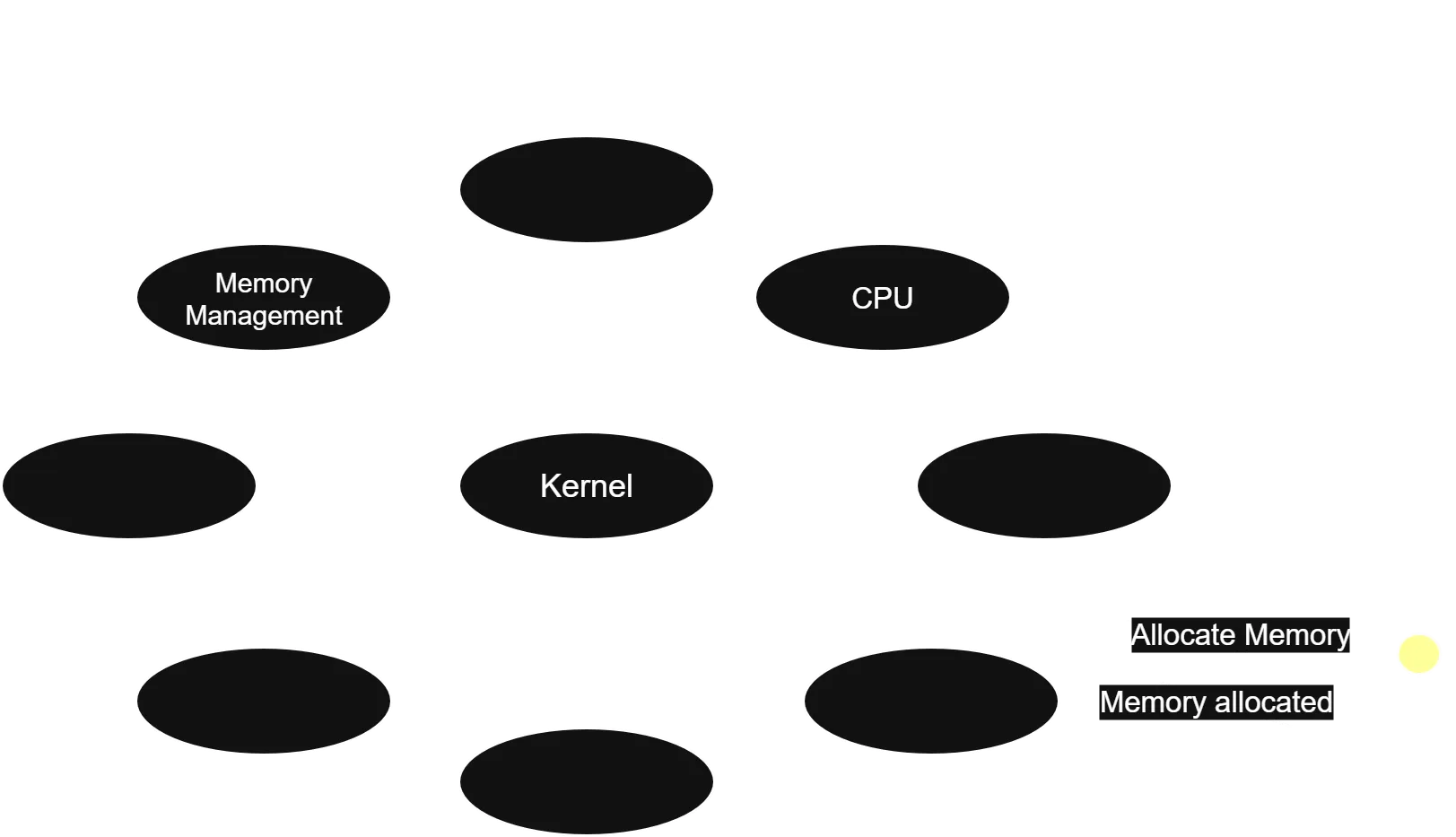
Modular architecture follows principles similar to a monolithic architecture but provides a more flexible design.
-
A central kernel is responsible for major operating-system operations.
-
The kernel contains core functionality.
-
Additional services are implemented as modules.
-
Modules can be loaded:
- During system boot (boot time)
- While the system is running (runtime)
-
Sun Solaris is an example associated with modular operating-system architecture.
Main idea:
Kernel + Dynamically Loadable Modules = Modular Architecture
Single-User Operating System (SUS)
Definition
A Single-User Operating System is designed for one user to actively use the system at a time.
The system’s resources, such as CPU, memory, storage, and I/O devices, are primarily available to that user.
Single-user does not mean single-tasking.
A single user can run multiple applications at the same time.
Key Points
- Only one user uses the system at a time.
- Resources are primarily dedicated to that user.
- Supports multitasking.
- Has a simpler design compared with a multi-user system.
- Requires fewer user-access and permission mechanisms.
- Generally provides a user-friendly environment.
- Commonly associated with personal computers and laptops.
- Suitable for individual productivity tasks.
Benefits
- Simple to use and manage
- Quick response time
- Lower system complexity
- Easy installation and maintenance
- Cost-effective for personal use
- Good performance for individual users
Limitations
- Does not support simultaneous users.
- Limited scalability for large organizations.
- Limited resource sharing between users.
- Less suitable for large shared environments.
- Limited centralized management.
- Not ideal for enterprise systems requiring many simultaneous users.
Example / Code
Examples of systems commonly used in a single-user/personal-computing context include:
- Windows on a personal computer
- macOS on a personal computer
Important: Modern operating systems such as Windows and macOS can have multiple user accounts, but ordinary desktop use is generally centered around one active interactive user session at a time. Therefore, the simple classroom definition of “single-user” should not be confused with “only one user account exists.”
Explanation
Suppose you are using a personal computer:
User
  ↓
Operating System
  ↓
CPU + RAM + Storage + I/O
The operating system manages these resources primarily for that user’s applications.
For example, you can simultaneously:
- Browse the web
- Play music
- Edit a document
- Run a code editor
This is multitasking, even though there is only one active user.
Output (if any)
No program output.
Common Mistakes
-
❌ Single-user means single-tasking. ✅ A single-user OS can support multitasking.
-
❌ A single-user OS cannot connect to a network. ✅ It can connect to networks and use network services.
-
❌ Single-user means the computer has only one user account. ✅ The concept primarily concerns simultaneous/active use, not necessarily the number of accounts.

Multi-User Operating System
Definition
A Multi-User Operating System allows multiple users to access and use computer resources concurrently.
The operating system manages resources and permissions so that users can work without interfering with one another.
Key Points
- Multiple users can access system resources.
- CPU, memory, storage, and I/O resources are shared.
- Users can have different permissions.
- Provides user authentication and access control.
- Supports multiple users and processes.
- Provides better resource sharing.
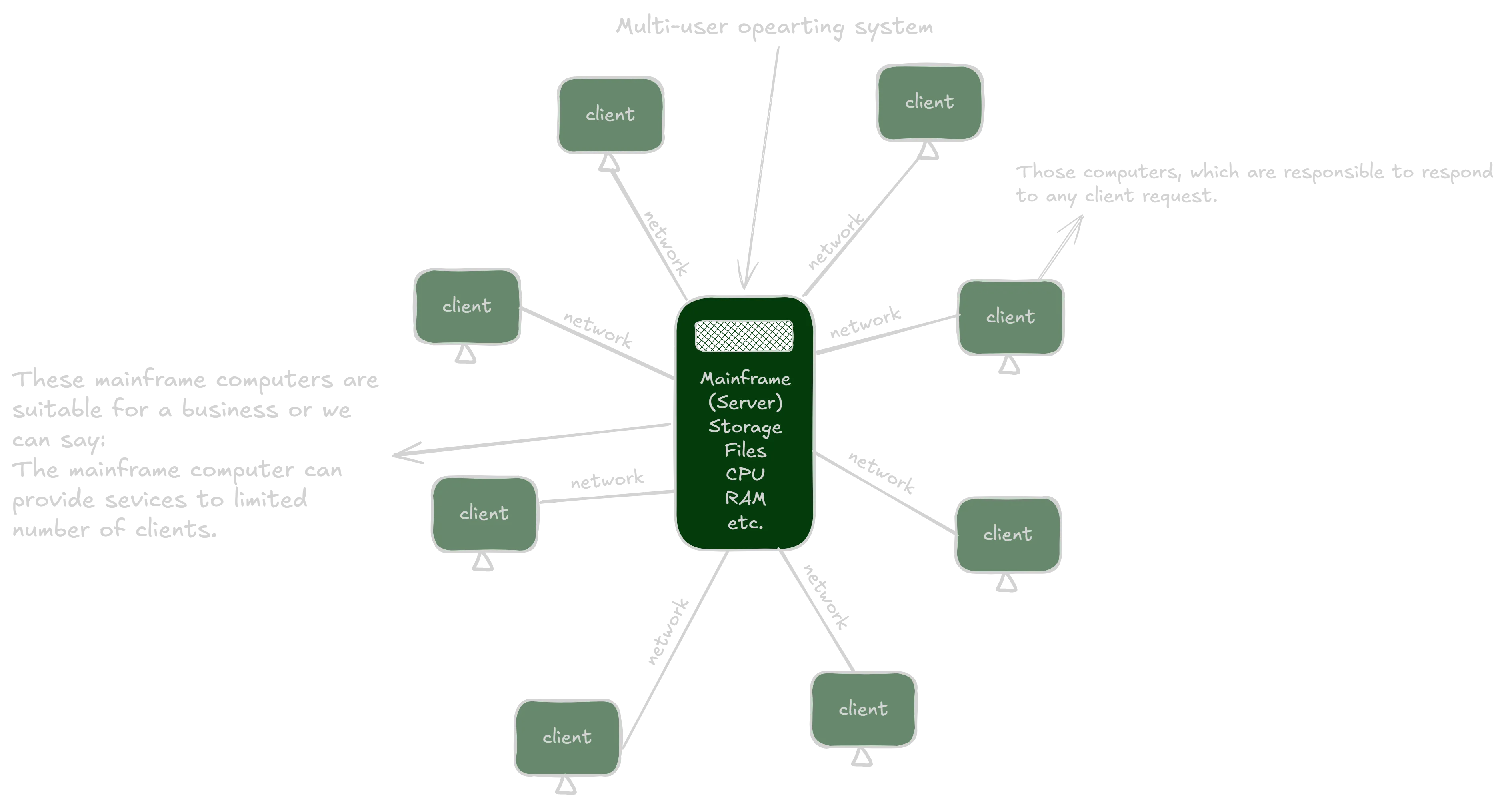
- Common in servers, mainframes, and large computing environments.
A typical simplified model is:
Client 1 ─┐
Client 2 ─┼──→ Server / Main Computer
Client 3 ─┘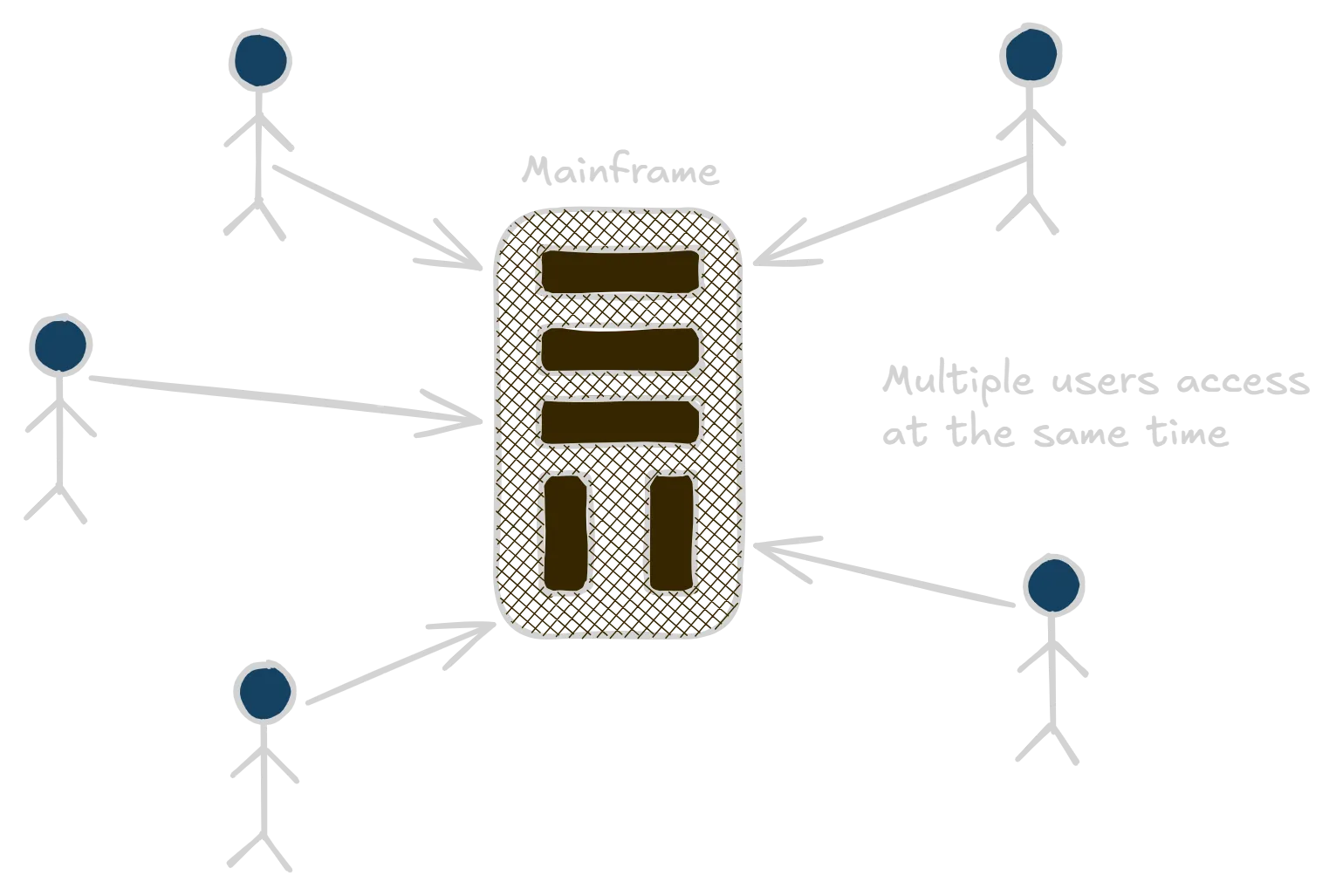
The server provides services and resources to connected clients.
Correction: A multi-user OS does not necessarily require the Internet. Multiple users can access a system through a local network or directly through terminals, depending on the system.
Types of Multi-User Operating Systems
There are three major types in these notes:
- Distributed System
- Time-Sliced System
- Multiprocessor System
1. Distributed System
Definition
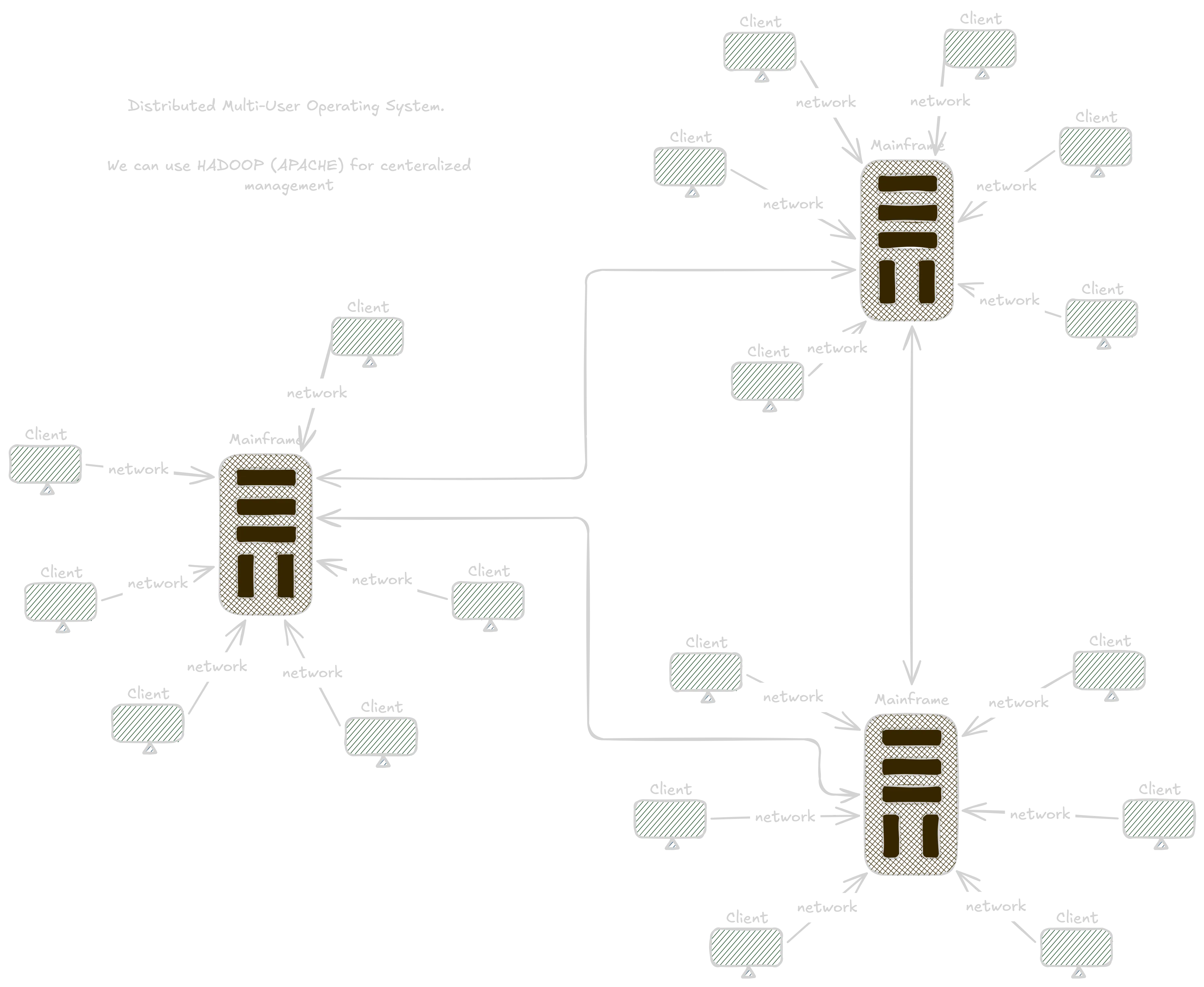
A Distributed Operating System manages multiple separate computers connected through a network and attempts to provide users with a unified system or service.
The machines cooperate and share processing, storage, or other resources.
Key Points
- Uses multiple network-connected computers.
- Computers cooperate to perform tasks.
- Resources can be distributed across machines.
- Provides scalability.
- Can improve reliability and fault tolerance.
- Attempts to provide a unified experience.
Scalability
Scalability means the ability to increase system capacity by adding additional computing resources.
For example:
Before:
Computer A + Computer B

After:
Computer A + Computer B + Computer C + Computer D
Adding machines can increase the system’s capacity.
Example / Code
Apache Hadoop is an example of distributed computing technology used to process and store large datasets across clusters of computers.
Other real-world applications of distributed computing include:
- Electronic banking systems
- Large-scale social-media applications
- Cloud computing platforms
Important correction: Hadoop is better described as a distributed data-processing/storage framework, not a complete general-purpose distributed operating system.
Explanation
Instead of depending on one computer:
          Network
       /     |      \
   PC A    PC B    PC C
       \     |      /
        Distributed
          System
Multiple computers cooperate to provide services.
If one machine becomes unavailable, some distributed systems can continue operating using other machines, depending on their design and redundancy.
Output (if any)
No program output.
Common Mistakes
-
❌ Distributed system means all computers are physically inside one machine. ✅ They are separate computers connected through a network.
-
❌ Hadoop is exactly the same as a distributed operating system. ✅ Hadoop is primarily a distributed storage and data-processing framework.
-
❌ Distributed systems always guarantee that failure of one computer has no effect. ✅ Reliability depends on redundancy and system design.
2. Time-Sliced System
Definition
A Time-Sliced System, also called a Time-Sharing System, divides CPU time into small units called time slices or time quanta.
Each process receives a limited amount of CPU time before the CPU is assigned to another process.
Key Points
- CPU time is divided into small intervals.
- Each process receives a time slice.
- After its time slice expires, another process can run.
- Allows many processes/users to share the CPU.
- Improves responsiveness and fairness.
Example:
CPU Time:

| P1 | P2 | P3 | P1 | P2 | P3 |
If each process receives 10 ms:
P1 → 10 ms
P2 → 10 ms
P3 → 10 ms
P1 → 10 ms
...
The rapid switching makes the system appear to run many processes simultaneously.
Example / Code
A simple conceptual example:
Process     Time Slice
P1          10 ms
P2          10 ms
P3          10 ms
The CPU repeatedly gives each process its allocated time.
Explanation
A CPU cannot necessarily execute every process at exactly the same instant on a single processor.
Instead, the operating system performs context switching:
P1 → P2 → P3 → P1 → P2 → P3Because switching happens very quickly, users experience the system as responsive and interactive.
Output (if any)
No program output.
Common Mistakes
-
❌ Time slice and process are the same thing. ✅ A time slice is a limited amount of CPU time allocated to a process.
-
❌ Time-sharing means every process runs for unlimited time. ✅ Each process receives a limited CPU interval.
-
❌ Time-sharing requires multiple CPUs. ✅ A single CPU can use time-sharing.
3. Multiprocessor System
Definition
A Multiprocessor System is a computer system containing two or more processors/CPU cores that can work together to execute tasks.
Processors may share resources such as:
- Main memory
- System buses
- I/O devices
This enables parallel processing.
Key Points
Advantages
- Increased performance: Multiple processors can execute tasks in parallel.
- Better resource utilization: Work can be distributed among processors.
- Higher reliability: Some systems can continue operating if one processor fails, depending on the architecture.
Types
There are two primary types covered in the teacher’s slides:
- Symmetric Multiprocessing (SMP)
- Asymmetric Multiprocessing (AMP)
The notes also mention massively parallel processors, which is a broader concept rather than one of the two primary types listed in the slide.
Symmetric Multiprocessing (SMP)
Definition
In Symmetric Multiprocessing, all processors have equal status and can execute operating-system and application tasks.
       Operating System
        /      |      \
      CPU 1   CPU 2   CPU 3
        \      |      /
          Shared Memory
Key Points
- All processors work equally.
- Processors share memory/resources.
- There is no single master processor controlling all work.
- Tasks can be distributed among processors.
Asymmetric Multiprocessing (AMP)
Definition
In Asymmetric Multiprocessing, one processor acts as the master, while other processors perform tasks assigned to them.
          Master CPU
         /    |     \
      CPU 2  CPU 3  CPU 4
Key Points
- One processor has a controlling/master role.
- Other processors perform assigned tasks.
- Work is managed by the master processor.
- This differs from SMP, where processors have equal roles.
Massively Parallel Processing
Definition
Massively Parallel Processing (MPP) uses a very large number of processors or processing units to perform computations in parallel.
The exact number is system-dependent; it is not simply defined as “100/1000+ CPUs.”
Example / Code
Conceptually:
Task
 ↓
 ┌────┬────┬────┬────┐
CPU 1 CPU 2 CPU 3 CPU 4
 └────┴────┴────┴────┘
        ↓
   Parallel Work
Instead of one processor doing all the work sequentially, many processors work on different portions of a problem.
Explanation
Consider four independent tasks:
Single Processor:

Task 1 → Task 2 → Task 3 → Task 4
With multiple processors:
CPU 1 → Task 1
CPU 2 → Task 2
CPU 3 → Task 3
CPU 4 → Task 4
The tasks can potentially finish faster because they are processed in parallel.
Output (if any)
No program output.
Common Mistakes
-
❌ Multiprocessor means multiple users. ✅ Multiprocessor means multiple processors.
-
❌ SMP has one master processor. ✅ SMP processors have equal status.
-
❌ AMP processors are all equal. ✅ AMP has a master processor and assigned processors.
-
❌ More processors always make every program proportionally faster. ✅ Speedup depends on whether the workload can be parallelized and on system overhead.
Scheduling Algorithms Mentioned in the Notes
First Come, First Served (FCFS)
Definition
First Come, First Served (FCFS) executes processes in the order in which they arrive.
Arrival:
P1 → P2 → P3

Execution:
P1 → P2 → P3
If P1 requires a long time, P2 and P3 must wait.
Common Mistake
The statement “there is no wait time” is incorrect.
FCFS can produce significant waiting time, especially when a long process arrives before shorter processes.
Shortest Job First (SJF)
Definition
Shortest Job First (SJF) selects the process with the smallest CPU burst time first.
For example:
P1 = 8 ms
P2 = 3 ms
P3 = 5 ms
Execution order:
P2 → P3 → P1Important Point
SJF does not eliminate waiting time.
It generally minimizes average waiting time when the required CPU burst times are known accurately, but longer processes may experience starvation if shorter jobs continually arrive.
Explanation
Compare:
FCFS:
P1 (8) → P2 (3) → P3 (5)
versus:
SJF:
P2 (3) → P3 (5) → P1 (8)
SJF allows shorter jobs to finish earlier, while FCFS strictly follows arrival order.
Short Exam Notes
Layered Architecture
- Bottom = Hardware
- Top = User interface
- Each layer serves the layer above.
- Each layer depends on the layer below.
- Advantages: customization, verification, portability, stability, security
- Disadvantage: complex design
Modular Architecture
- Based on monolithic principles with better modularity.
- Central kernel performs core operations.
- Additional functionality provided through modules.
- Modules can be loaded at boot time or runtime.
- Example: Sun Solaris
Single-User OS
- One active user at a time.
- Resources primarily dedicated to that user.
- Can support multitasking.
- Simpler security and management.
- Common in personal computing.
Multi-User OS
- Multiple users can access resources concurrently.
- Resources are shared.
- Uses authentication and permissions.
- Common in servers and large computing environments.
Distributed System
- Multiple separate computers cooperate over a network.
- Provides unified services.
- Improves scalability and reliability.
- Hadoop is a distributed computing/storage framework.
Time-Sliced System
- CPU time divided into time slices/time quanta.
- Processes receive limited CPU time.
- Uses context switching.
- Also called time-sharing.
Multiprocessor System
- Uses two or more processors.
- Enables parallel processing.
- Types:
- SMP: processors are equal.
- AMP: one master assigns tasks.
- MPP: large-scale parallel processing.
FCFS
- First process to arrive executes first.
- Simple scheduling algorithm.
- Can cause high waiting time.
SJF
- Shortest CPU burst executes first.
- Can reduce average waiting time.
- Does not mean zero waiting time.
- Long processes may suffer starvation.