Flow Diagram
PCB (Process Control Block)
- Process ID
- Program Counter
- Process Priority
- PCB Pointer
- List of Open Files
- CPU Register
- Memory Management Information
- I/O Status Information
- Scheduling Information
2. Program Counter
The program counter stores information about which next instructions are going to be executed by CPU.
Priority Example in Arithmetic Operations:
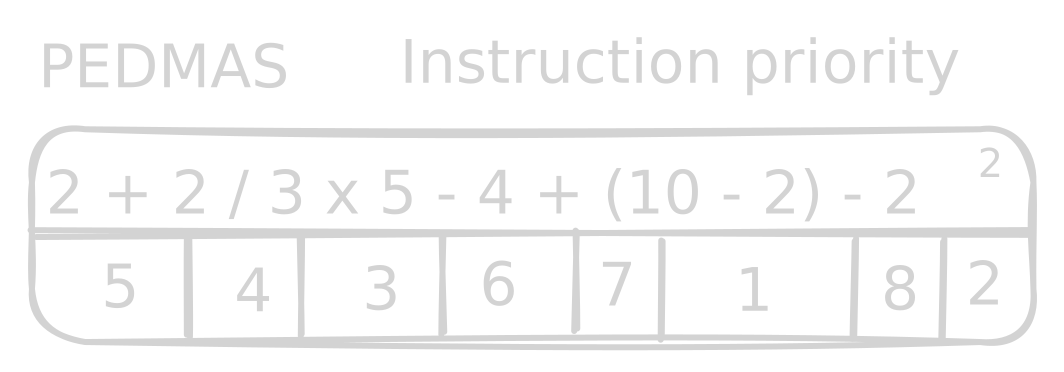
3. Process Priority
The priority is a numerical value which is assigned while a process is created.
Note: The lesser number, the higher its value / priority.
- Priority makes CPU/attention to process execution.
Why does the execution prioritize processes?
For two reasons:
-
Starvation: The situation or condition where a process never gets CPU time.
-
Consumption Resources
Age/Aging
- It is a technique or method of giving priority to a process until the process gets CPU Time.
Note: Age increases the priority.
4. PCB Pointer
- The PCB pointer stores information about the next PCB to be executed.
5. List of Open Files
- The information of open files is stored into PCB. As once the process terminates, the open files need to be closed by OS.
6. CPU Register
- Register is a memory.
- Register is a temporary memory.
- Register is the fastest memory among all types of memories.
- Register memory is close (near) to CPU.
- CPU time unit is millisecond.
- Register time unit is nanosecond.
[!NOTE] Time Units
- 1 second = 1000 milliseconds = 1,000,000,000 nanoseconds
- 1 millisecond = 1,000,000 nanoseconds
- 1 second = 1000 milliseconds
- 1 millisecond = 1000 microseconds
- 1 microsecond = 1000 nanoseconds
Register Types
- AX = Accumulator Register: Arithmetic operations or mathematical operations are stored.
- BX = Base Register: Logical operations are stored in here.
Register Attributes
-
Stack Pointer:
- It shows the temporary free space to CPU so that CPU can save the PCB in there.
-
Index Register:
- The movement through the list.
-
Status Flag:
- Flag the issues.
In very simple words we can say that registers are used to store the information of different tasks which are not currently processed like if we have a task that is currently running and due to need for input output devices it is sent to register it is basically like a checkpoint so whenever the process is loaded again to the CPU it starts from where it left off instead of restarting the whole task.
7. Memory Management Information
- The memory management information store information about process allocated how much memory or RAM.
E.g:
- P1 = 200MB
- P2 = 10MB
- P3 = 1.4GB
- P4 = 5MB
8. I/O Status Information
- It stores which I/O devices are allocated to a process.
E.g:
-
P1 = Printer
-
Requests of I/O by the processes.
9. Scheduling Information
- Priority
- Scheduling Queue Pointer
- Parameters (FCFS, SJF, RR)
Queue = Lines
Types
1. Job Queue
- All processes waits in line for getting RAM.

2. Ready Queue
- All processes are waiting to get CPU time.

3. Device I/O Queue
- All processes are waiting to get requested I/O devices.

4. Blocked/Waiting Queue
- When a program or a process is not ready to be scheduled to run.
E.g:
- A process is waiting for some data to be received.